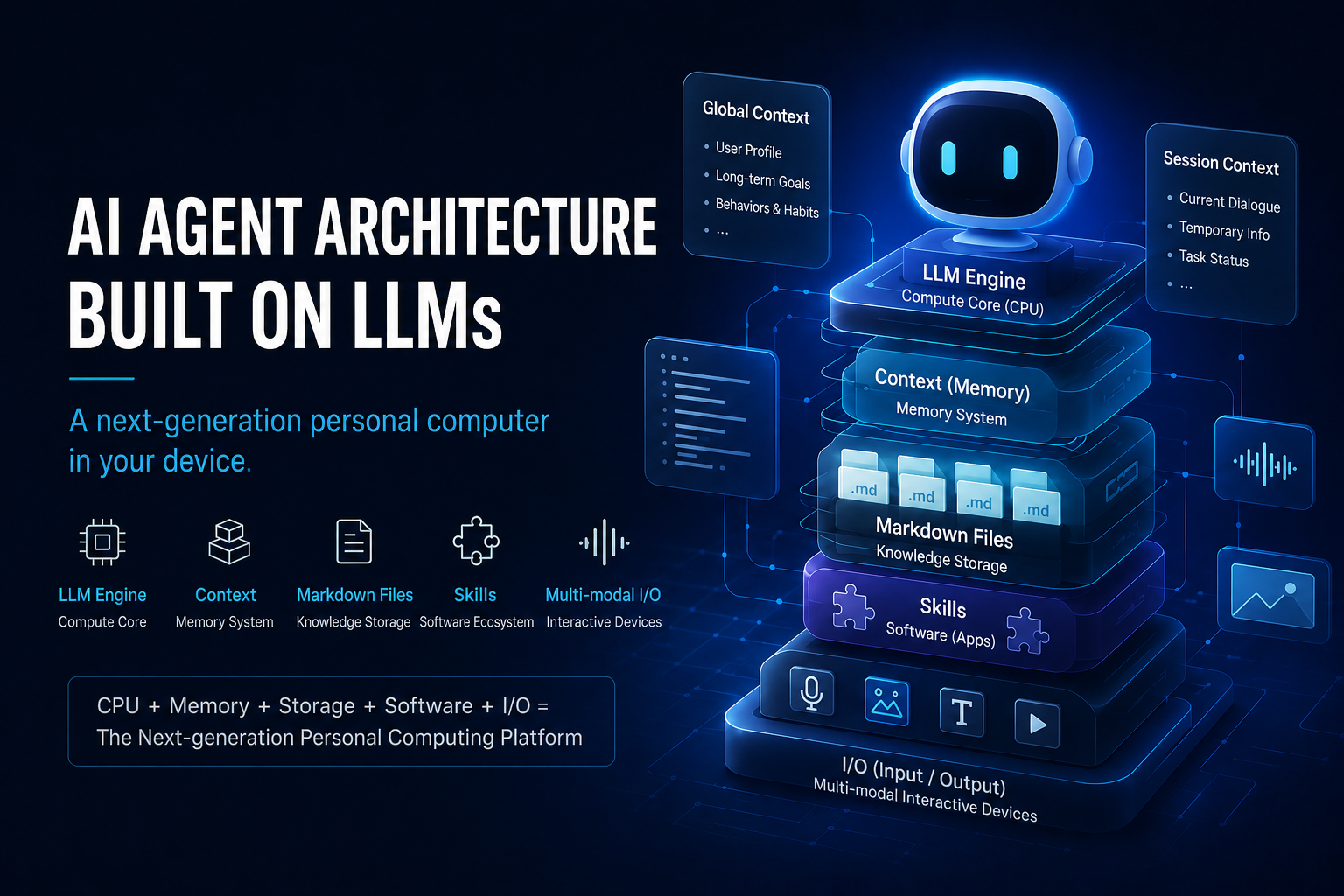
LLM-Based AI Agent Architecture: A New Kind of Personal Computer on Your Device
For a long time, we’ve thought of AI as a “chatbot.”
But if you step back and look from a systems architecture perspective, you’ll find that a truly mature AI agent looks more like a new kind of personal computer — one that lives on your device.
It has:
- A compute core
- Memory
- A file system
- A software system
- Input/output devices
- Long-term storage
The difference is:
Its core isn’t a traditional CPU. It’s an LLM.
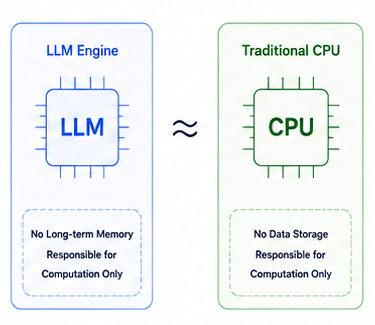
Part 1: The LLM Engine — A “CPU” Without Memory
The LLM itself has no long-term memory.
It’s more like an inference engine:
- Receives input
- Reads context
- Performs reasoning
- Produces output
- Then “forgets”
It cannot natively remember things that happened in the past.
Therefore:
The LLM itself is more like a CPU than a complete agent.
It only handles computation.
What makes AI “seem like it knows you” is the context provided externally.
Part 2: Context — The AI Agent’s Memory
If the LLM is the CPU,
then Context is the AI’s memory.
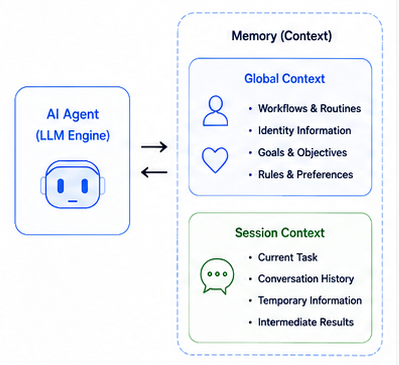
And this memory should be split into two layers.
1. Global Context
This layer belongs to the entire agent.
It records:
- User preferences
- Long-term goals
- Habitual behaviors
- Persona settings
- Persistent rules
- Historical knowledge
For example:
- “User prefers Markdown”
- “User is learning AI Agents”
- “User habitually writes in Chinese”
This information shapes agent behavior over time.
2. Session Context
This layer belongs only to the current conversation.
For example:
- The current topic under discussion
- The current article structure
- The most recent rounds of dialogue
- Temporary reasoning results
It’s more like temporary memory during program execution.
The Context Window Is Essentially a “Memory Limit”
An LLM’s Context Window isn’t unlimited.
This means:
- History can’t accumulate indefinitely
- Information gets more expensive as the window fills
- Past the limit, content must be compressed
Therefore:
An agent must manage memory like an operating system:
- Compress history
- Summarize
- Clear low-priority information
- Transfer long-term data
- Dynamically load needed data
Therefore:
The Context Window is essentially the AI’s memory capacity.
Part 3: Markdown Files — The Agent’s Hard Drive
Long-term data shouldn’t stay in the context window.
Otherwise:
- Costs keep rising
- Inference slows down
- The context balloons rapidly
Therefore:
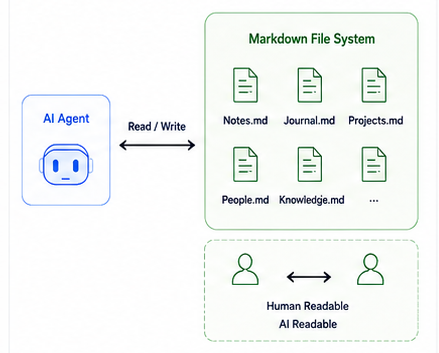
Long-term memory should live in a file system.
And one very natural form is Markdown files.
For example:
- Notes
- Project materials
- Journals
- World-building
- User profiles
- Writing material
- Long-term knowledge bases
All of these can be stored as Markdown.
This means:
| Traditional Computer | AI Agent |
|---|---|
| Hard Drive | Markdown File System |
Markdown has one enormous advantage:
It can be read by AI and directly by humans alike.
Therefore:
- Humans can edit it
- AI can process it
- Git can version-control it
- Files can sync
- It persists even without AI
This creates something like:
“A shared knowledge space between humans and AI.”
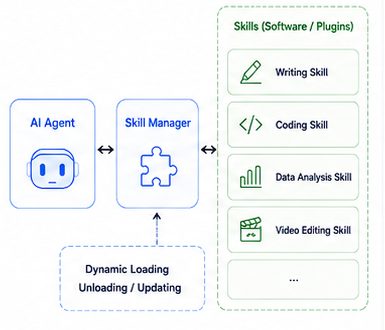
Part 4: Skills — Software Installed on AI
Future AI agents won’t only have “knowledge.”
They’ll also have “skills.”
For example:
- Writing Skill
- Programming Skill
- Video Editing Skill
- Data Analysis Skill
- Project Management Skill
These Skills might be composed of:
- Prompts
- Workflows
- Python code
- MCP configurations
- Tool invocation rules
They are like:
Software installed on the AI.
Therefore:
| Traditional Computer | AI Agent |
|---|---|
| Software / App | Skill |
Skills can be:
- Installed
- Uninstalled
- Updated
- Shared
- Combined
In the future there may even be:
- Skill Stores
- Skill Marketplaces
- Open-source Skill communities
Part 5: Input/Output — More Than Just Text
One of the biggest misconceptions about traditional chatbots is that people think AI only communicates through text.
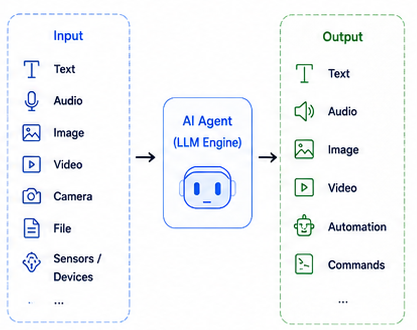
In reality, future AI agents will have a complete multimodal I/O system.
Input
AI can read:
- Text
- Voice
- Images
- Video
- Camera feeds
- Files
- Screen content
- Device state
Output
AI can generate:
- Text
- Voice
- Images
- Video
- Automated actions
- Control commands
Therefore:
An AI agent is fundamentally a new interaction layer.
The Complete System: A “Von Neumann-style” AI Computer
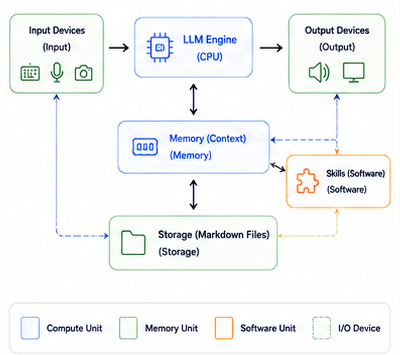
When you put the whole architecture together:
| Traditional Computer | AI Agent |
|---|---|
| CPU | LLM Engine |
| Memory | Context |
| Hard Drive | Markdown File System |
| Software | Skill |
| Input Device | Multimodal Input |
| Output Device | Multimodal Output |
You’ll find:
It increasingly resembles a real computer.
Except:
This computer isn’t built around a GUI.
It’s built around:
“Language comprehension and reasoning.”
The Operating System: A Personal AI OS
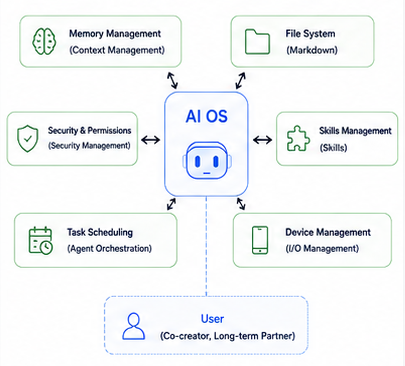
In the future, every person’s device may host a persistent AI Agent.
One that:
- Understands you
- Remembers you
- Helps you work
- Manages your knowledge
- Schedules your Skills
- Operates your devices
- Grows alongside you over time
At that point:
What we use might no longer just be:
- Windows
- macOS
- Android
But rather:
A new kind of personal AI operating system, with LLM at its core.
And the chat box we use today
may only be the earliest prototype of this new era.
References
Park, Joon Sung et al.
MemGPT: Towards LLMs as Operating Systems
arXiv:2310.08560
https://arxiv.org/abs/2310.08560Wang, Lei et al.
LLM as OS, Agents as Apps: Envisioning AIOS, Agents and the AIOS-Agent Ecosystem
arXiv:2312.03815
https://arxiv.org/abs/2312.03815